Introduction
SANCE is a platform for AI agents that run sales and customer-service communications. You connect messaging channels and a CRM, configure one or more AI agents, and the platform runs the conversations — inbound and outbound — while keeping your pipeline and CRM up to date. But it goes beyond automation: it builds the scientific method into your funnel — data → hypothesis → experiment → deployment — so the funnel keeps improving, with you only reviewing and accepting.
What you can do
Experiments & self-optimization
This is what sets SANCE apart — it operationalizes the scientific method on your funnel (data → hypothesis → experiment → deployment), so it measurably improves rather than just runs. You stay in control of the one decision that matters: approve or reject.
- A/B experiments. Split an agent's leads into weighted variant buckets that override prompts, model configuration, or outreach settings, and compare variants on real outcomes. Assignments are tracked per lead so results are attributable.
- Iterate on business metrics. Run experiment after experiment against the numbers that matter — reply rate, meetings booked, conversions — not vanity metrics.
- Reinforcement-learning optimization loop. The platform builds an RL-style dataset from your real traffic (dialogues, stage movements, outcomes, prompt-version changes), labels conversations by outcome, contrasts what separates won deals from lost ones, and writes a findings report. It then proposes a ready-to-run A/B plan — including an automatically rewritten prompt variant (with placeholder-safety checks) — that you launch with one click. The analyze → experiment → improve loop becomes increasingly hands-off.
The agent engine
- Visual state machine. A state-tree flow builder drives behavior in pre-reply and post-reply phases — far beyond a single system prompt.
- Conditional & LLM-decision logic. Mix deterministic conditions with LLM-judged ones, with an arbiter that resolves competing signals.
- Configurable hooks & tools. Trigger logic on reply, on CRM-field/stage change, on new inbound lead, on failed outreach, or from a tool call — including external lifecycle hooks and long-running async tool calls with run-scoped call, time, repetition, and token limits.
- Multi-LLM with fallback. OpenAI, Gemini, Anthropic, Grok, open-source models, and more — per-role model config with automatic fallback chains on provider failure.
- In-house RAG engine. Retrieval over your own knowledge base (chunking, embeddings, reranking) that scales to hundreds of documents.
- Shared memory. Research, CRM fields, tags, events, and dialogue summaries persist on the lead and are available to every agent in the funnel.
- 🧑💼 Human-in-the-loop. When confidence is low, the agent pauses, asks a human operator, and continues with their answer — so control always stays with you. The operator can choose whether to save that answer to the agent's knowledge base for future questions.
Outbound
- Customizable multi-step dispatch. Ordered channel/contact steps (e.g. WhatsApp → Telegram → SMS) with per-step conditions, reply/confirmation timeouts, and limits.
- Automated lead research. Before reaching out, an agent can research each lead and use the findings to personalize the first touch — with optional human review of the result.
- LinkedIn invitations. Send connection invites / InMail before messaging, and wait for acceptance before the real outreach begins.
- Deliverability controls. Number warmup, per-channel daily limits (with separate sub-outreach limits for existing chats), send spacing, and automatic suppression of failing pairs.
- Follow-ups. Timed ping chains, stage-triggered messages, and operator-driven manual bulk sends.
Conversations & channels
- Two-way conversations on WhatsApp, Telegram, WABA, Instagram, email, SMS, LinkedIn and more via the providers you connect.
- Send and receive files — voice (auto-transcribed), images, and documents.
- WABA template management with 24-hour window openers.
- Input safety checks; inbound auto-start: a message from a known channel can create a lead and start an agent.
Actions, pipeline & CRM
- Agents act: move leads between stages, fill CRM fields, apply tags, book meetings via calendar integrations, and redirect / hand a lead to another agent.
- Two-way CRM sync (amoCRM, Kommo, Bitrix24, FastTrack, Usedesk, Google Sheets): import leads and sync stages, fields, tags, and messages.
- Pipeline stages, lead documents, and periodic LLM classification.
Insight & operations
- Pipeline funnel analytics and per-dialogue LLM cost attribution.
- Working-hours scheduling, human-like typing delays, message splitting, and debounce.
- Multi-tenant by design (company → product → agent), with usage and cost tracking.
How it all fits together
A few entities explain almost everything in the API. Learn these and the rest follows.
- Company — the top-level tenant account. Owns products, users, billing, and the credentials for channels and CRMs.
- Product — a workspace inside a company. It owns the pipeline, agents, leads, and most
other entities, and it is the unit of access control: most endpoints take a
product_idand check that your account can access it. - Agent — a configured AI assistant within a product: which LLM it uses, its prompts, enabled tools, outreach settings, and schedules.
- Channel — a connected messaging account (a number/account at a provider such as Wazzup24, GreenAPI, Wappi, ChatPush, …) the agent sends and receives through.
- Lead → Contacts → Dialogues → Messages — a lead is a potential customer; its contacts are the addresses you can reach it at; a dialogue is one conversation in one channel; and messages are the individual turns.
- Stages — positions in the product's pipeline; a lead sits on exactly one at a time.
- Outreach campaign — a configured outbound program; it produces a dispatch run per targeted lead and a dispatch attempt per contacted contact.
- CRM integration — a two-way connection to your CRM for importing leads and syncing stages, fields, tags, and messages.
The full per-entity contract (fields, types, status codes) is in the API Reference.
How a message is handled
When a message arrives (or an agent reaches out), it runs through a fixed processing pipeline before the LLM generates a reply — webhook ingress and normalization, context identification, A/B assignment, debounce and safety checks, pre-reply classifiers and the state-tree, knowledge retrieval (RAG) and prompt assembly, then post-reply actions such as CRM updates and calendar booking. The diagram below shows that flow end to end.
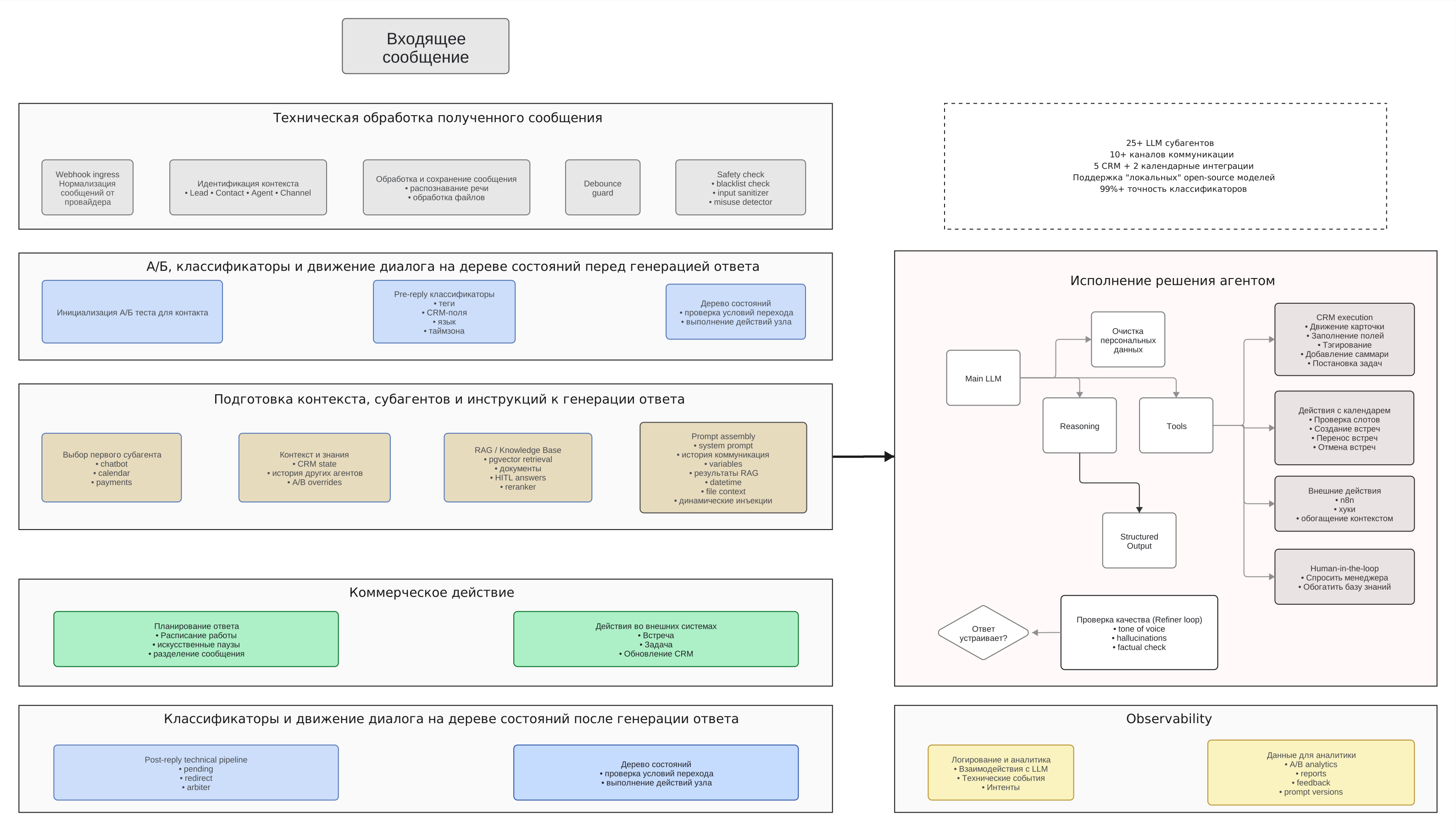
You don't call this pipeline directly — it runs inside the platform. The API gives you the inputs and outputs around it: leads/contacts to message, dialogues/messages to read, and the configuration (agents, prompts, channels, flows) that shapes how it behaves.
Next
- Quickstart — authenticate and make your first call.
- Cookbook — copy-paste recipes for the most common flows.